Sayinsit

Point of sale for shops and wholesalers in Myanmar

Every shop you run, in one app.

Sayinsit is a ready-made point of sale for retail and wholesale. It keeps the sales, stock, credit and cash of one shop or many, on the phone you already have, in Burmese or English. Sign up, add your products and sell the same day.

No card needed. Sign up with your phone number.

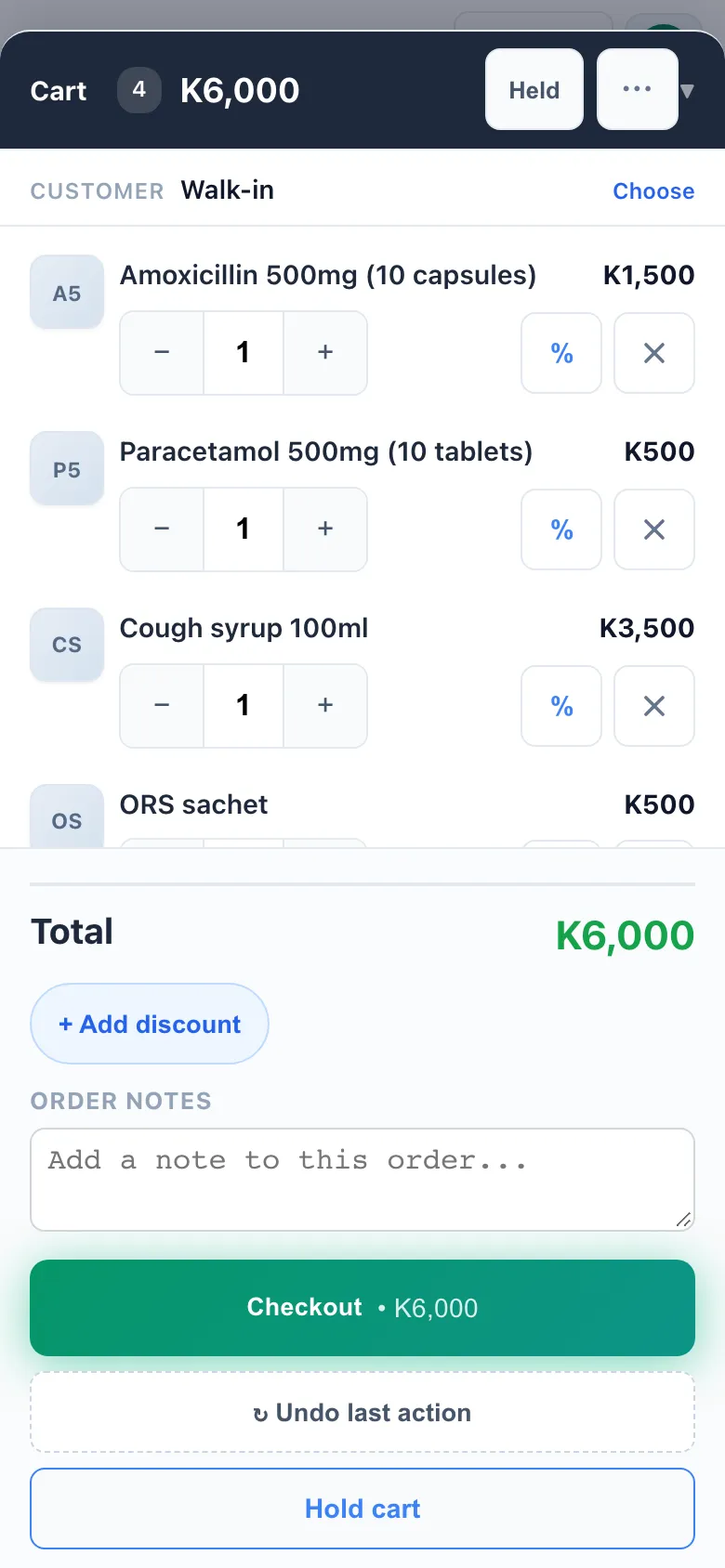
The sell screen on a phone: four medicines in the basket, the total, and the button to take payment.

Pick your kind of shop and the right things switch on: sizes and colours for clothes, IMEI numbers for phones, expiry dates for medicine.

  • Pharmacies
  • Mini-marts
  • Phone shops
  • Clothes shops
  • Cosmetics
  • Hardware
  • Wholesale
  • General stores

Retail and wholesale

From one counter to a row of shops

Start with one shop. When you open the next one, or start selling wholesale, it is already in the app. No new system, and nothing to move.

More than one shop

Open the next branch without changing apps.

  • Add the next shop yourselfOnce your first shop is paid, add the next one from the menu. Each new shop gets its own free month.
  • Each shop keeps its own booksIts own stock, cash, staff and reports, kept apart from the others.
  • One login for all of themSwitch between your shops without signing out.
  • A head office, freeWith two shops or more, put a head office above them: each shop’s account, and the money moved between them.

Wholesale

Sell by the carton to buyers you know, on credit.

  • Wholesale pricesA second price for wholesale customers, used automatically when you pick them.
  • Credit with a limitEach customer has a credit limit you set, and part payments are remembered.
  • How long it has been owedEach customer’s balance split by age: under 30 days, 30, 60, and 90 days and over.
  • Suppliers and ordersOrder from suppliers, receive the goods into stock, and see what you still owe them.
  • Bills that land in the buyer’s appWhen your buyer uses Sayinsit too, the bill you send lands in their account.

A day at the counter

From opening the shutter to counting the drawer

A normal day with Sayinsit. The pictures are the real screens.

  1. 018:00 am

    Open up and note the float

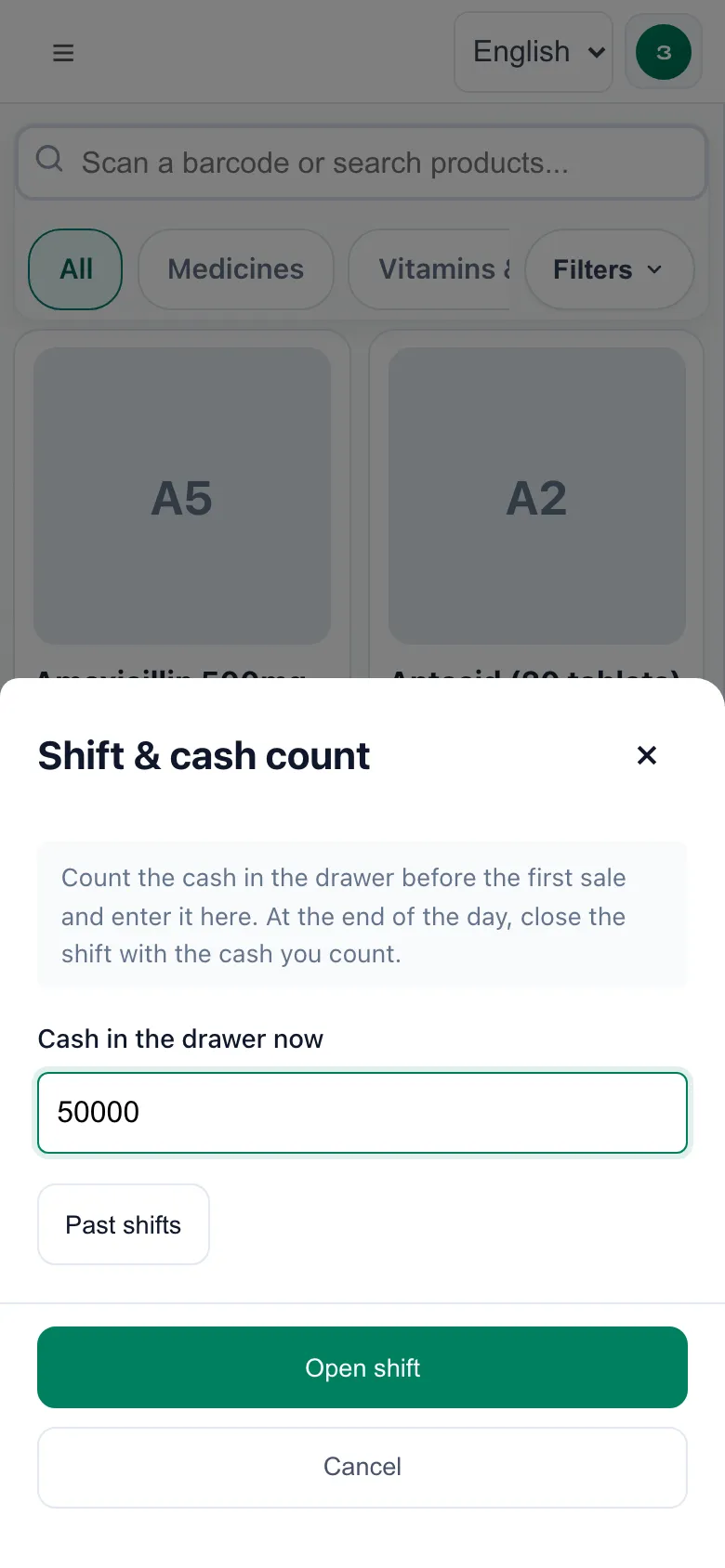
    Open a shift and type in the cash you put in the drawer for change. Tonight’s count starts from there.

    Opening a shift: a single box for the cash in the drawer, and a button to open.
  2. 0212:30 pm

    Sell

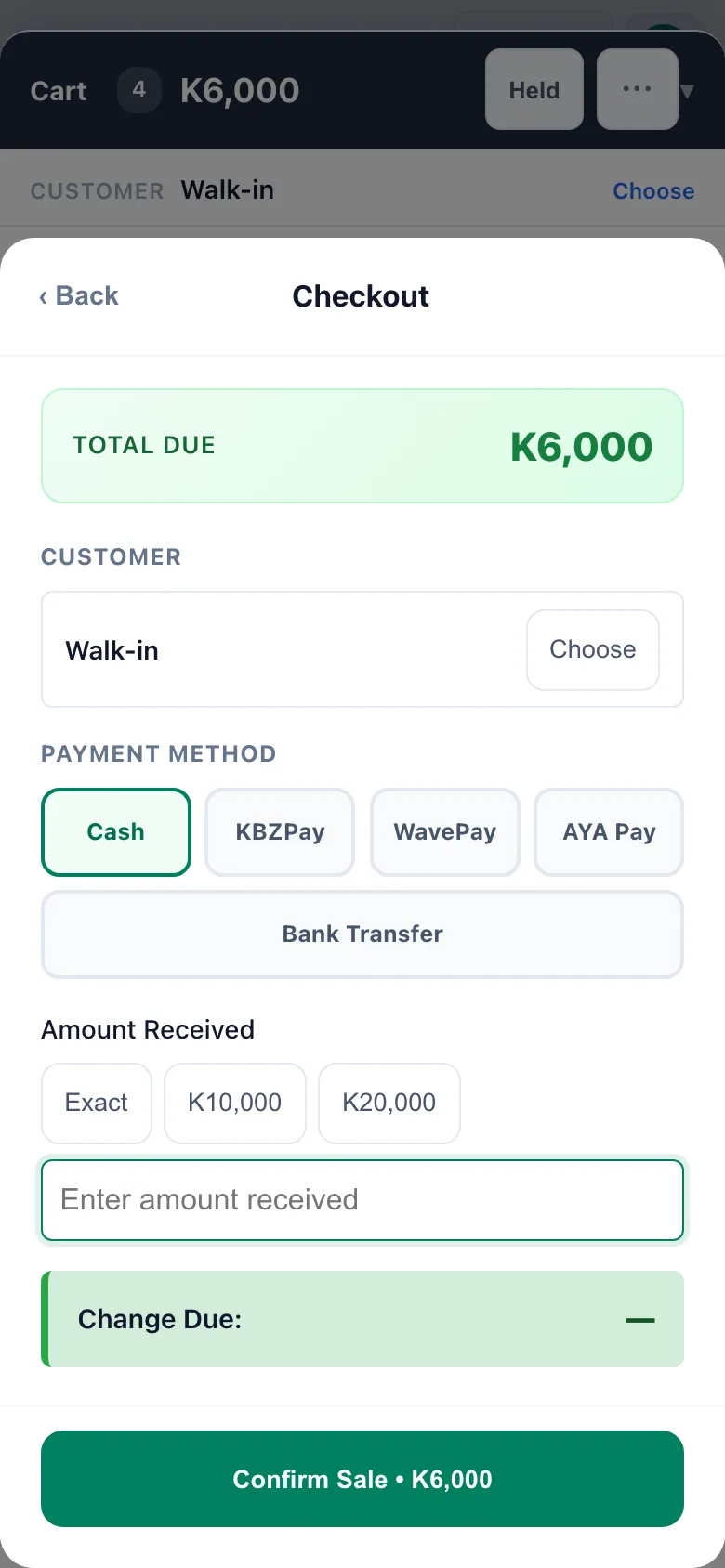
    Tap the items, or scan them with a barcode scanner. The customer pays in cash, KBZPay, WavePay, AYA Pay or by bank transfer, and you print the receipt. Stock goes down by itself.

    If the line drops halfway and you press Confirm again, the sale is still recorded only once.

    Taking payment: cash, KBZPay, WavePay, AYA Pay or bank transfer, with quick buttons for the notes people hand over.
  3. 032:00 pm

    See what expires soon

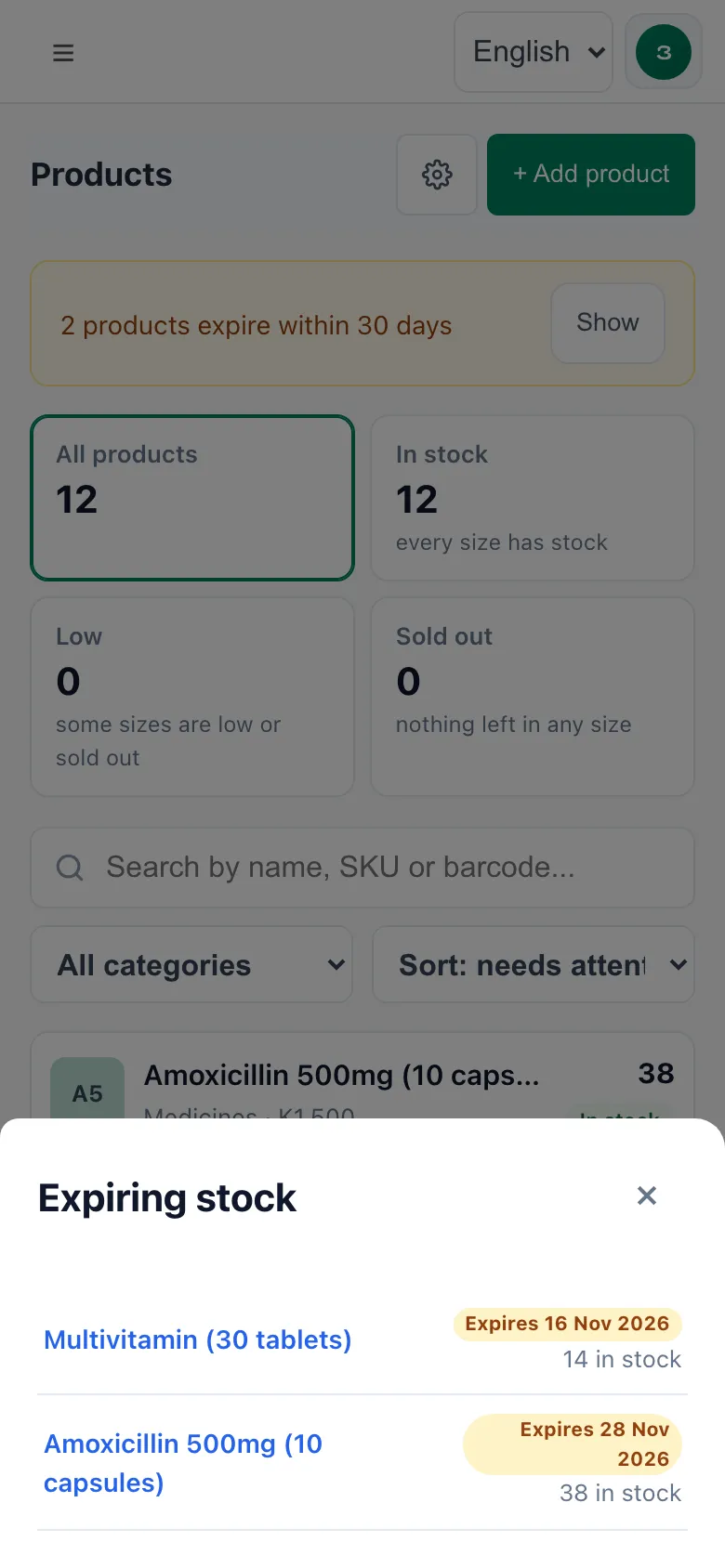
    Products shows everything that expires in the next 30 days, with the date and how many are left, so you can sell it first.

    The expiring stock list: two medicines, the date each one expires, and how many are left.
  4. 044:00 pm

    Credit, without the notebook

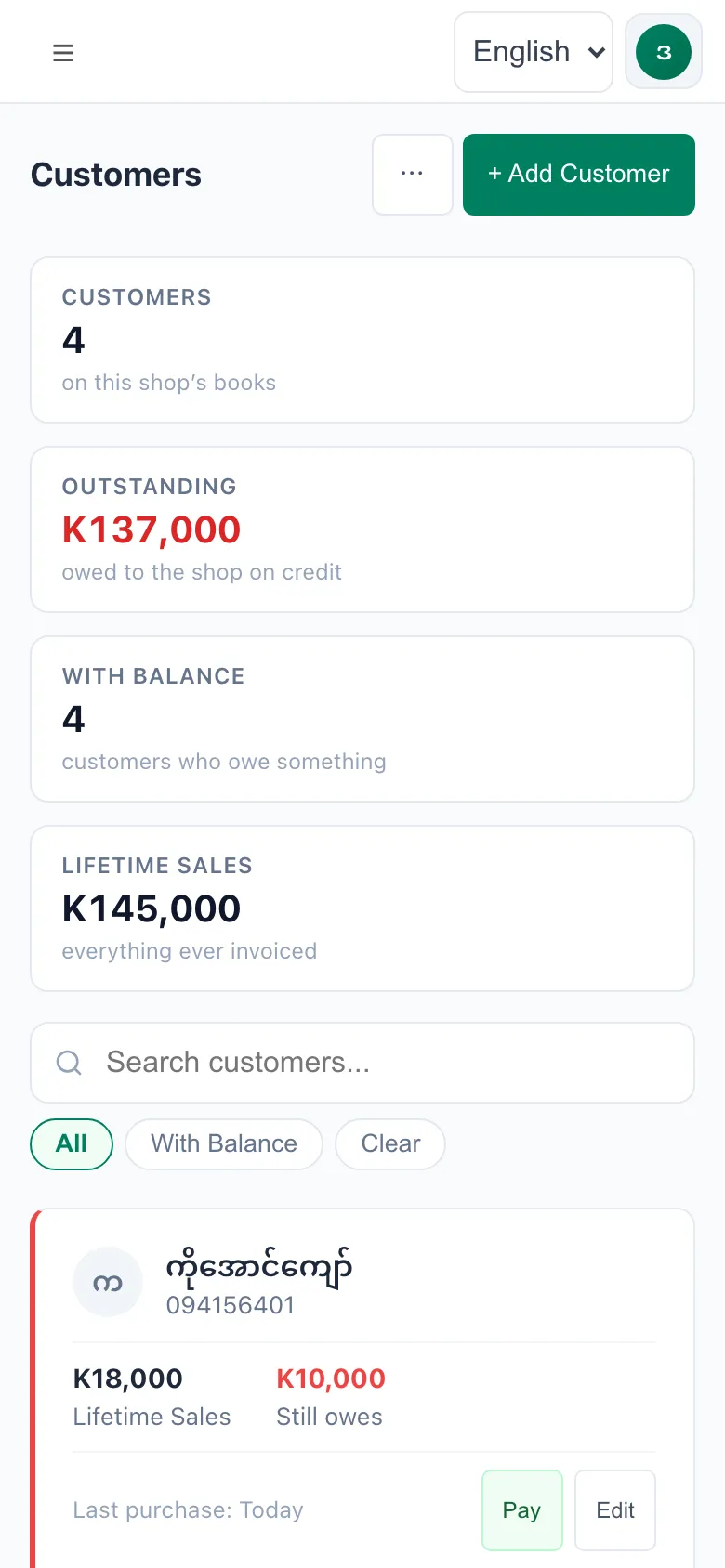
    When a clinic or a regular customer takes goods on credit, it goes against their name, with a limit you set for each person. If they pay part now, the rest is remembered, and when they come back and pay, it comes off straight away.

    One look shows how much is owed, and by whom.

    The customers list, showing what each customer still owes.
  5. 059:00 pm

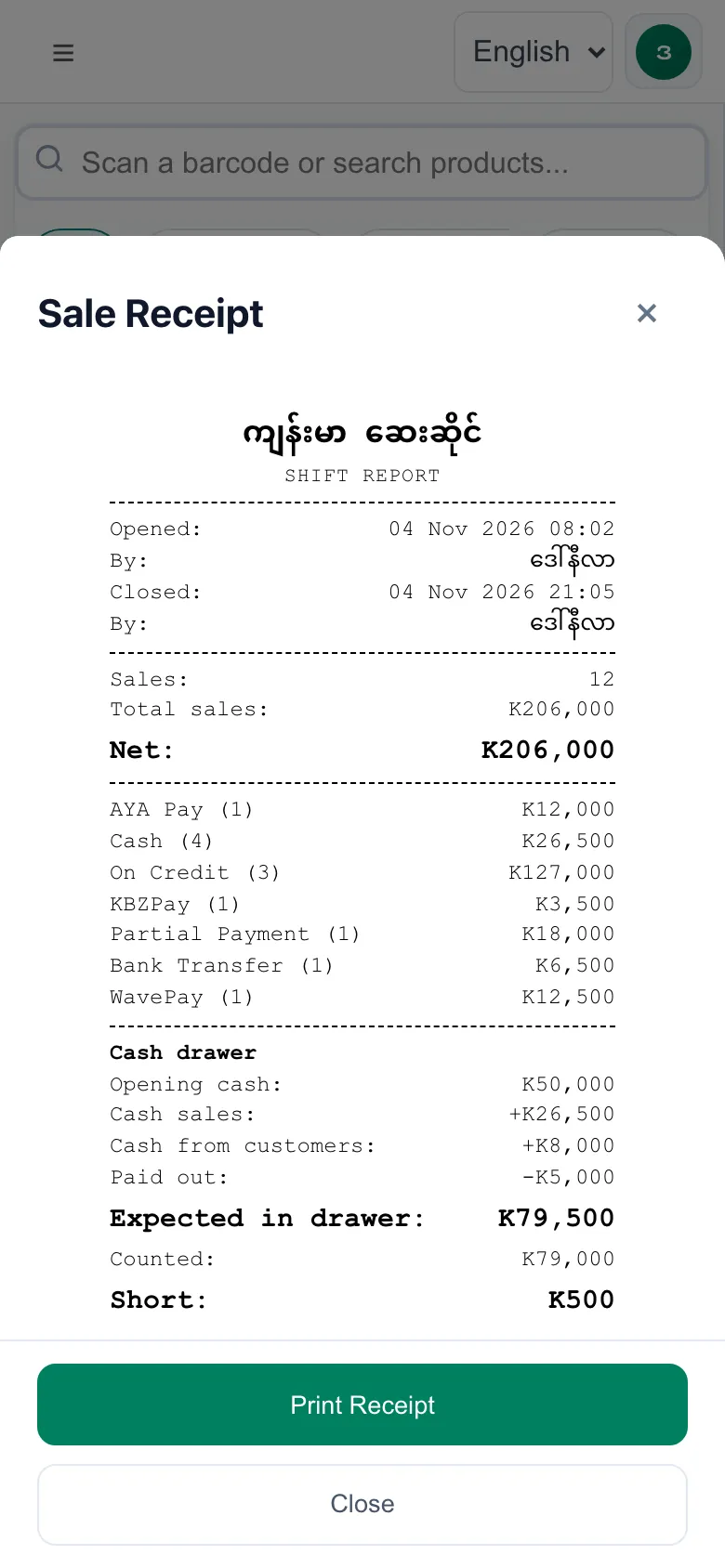
    Close and count

    Count the cash in the drawer and type it in. Sayinsit works out what should be there and tells you if you are short or over. KBZPay and WavePay are listed on their own, because that money never touches the drawer. Print the day’s report for your records.

    The end-of-day report: sales by payment method, cash expected, cash counted, and the difference.

Everything else

What every shop gets, for one price

Some of these stay off until you switch them on in Settings, so the screens only show what your shop uses.

Sell

  • Tap or scanTap the items or scan the barcode. Cash, KBZPay, WavePay, AYA Pay or bank transfer, and one bill can be split across several.
  • Keeps selling when the internet dropsSales are kept on the phone and sent by themselves when the line is back.
  • ReceiptsPrint on 58mm or 80mm receipt printers, including Bluetooth printers on Android.
  • Returns and refundsFind the sale by its receipt number and take the item back. Stock and cash are put right.
  • Shifts and the drawer countOpen with the float, close with the count, and see straight away if you are short or over.

Stock

  • Sizes and coloursOne shirt in five sizes and three colours, each with its own stock.
  • IMEI and warrantyFor phone shops: record each IMEI and print the warranty on the receipt.
  • Expiry datesFor pharmacies and groceries.
  • Bring your product listImport from Excel (CSV), up to 5,000 products at a time.

Money

  • Cash bookEvery kyat in and out of each shop, in one list.
  • ExpensesRent, electricity, salaries. Enter a monthly one once and it repeats.
  • LoansMoney you borrow, and each repayment with its receipt.
  • ReportsDaily sales and profit, best sellers, profit and loss, and what to reorder. Download them to Excel.

People

  • Staff logins and rolesEveryone has their own login. You decide what each person can see and do, down to looking at stock only.
  • Two-step sign-inA code from your phone as well as your password.
  • Burmese or EnglishEach person chooses their own language.

Online

  • An online storeSwitch it on and your products are on your own web page. Customers order online and pay you directly.

Your data

  • Backed up every nightA copy of everything, every night.
  • Your data is yoursDownload everything as spreadsheets whenever you like.
  • On your home screenAdd it to your phone’s home screen and it opens like an app.

Why we built it

We wrote it for our own shop first, because at nine at night the notebook never quite added up.

We are a small team from Myanmar, and we run a clothes shop ourselves. Every evening somebody counted the drawer, checked it against the notebook, and it was rarely right to the kyat. So we wrote the app we wanted at our own counter. Our shops use it every day.

Every screen is in Burmese, and each person picks their own language, so the owner can read English while the cashier reads Burmese.

The Sayinsit team

Pricing

One price per shop. The first month is free.

No card and no contract. Use it in your real shop for a month, then decide.

  1. Sign up and use it free for 30 daysEverything works during the trial. No card.
  2. We remind you before it endsThe app shows a notice seven days before.
  3. Pay the way you already payKBZPay, WavePay, AYA Pay or bank transfer. Send us the slip on Viber and your shop is switched on the same day.
  4. Stop, and nothing disappearsNothing is deleted when the trial ends. You can still sign in, see your records and download them.
KBZPay WavePay AYA Pay Bank transfer

Price list

Sayinsit


First month
FREE

K30,000

per shop, per month


Pay for a year
K300,000
(two months free)
Staff
no limit
Products
no limit
Head office
free
Help to set up
free
Start the free month

Questions

What shop owners ask us

Is it ready to use, or do you build it for us?

It is ready. Sign up, pick your kind of shop, add your products and start selling the same day. There is nothing to build or install, and no setup fee.

Do I need a card to try it?

No. Sign up with your phone number and a password. There is nothing to pay for the first month.

What do I need to run it?

Any phone, tablet or computer with a web browser: Android, iPhone, iPad, Windows or Mac. There is nothing to install from the Play Store, but you can add it to your home screen so it opens like an app.

Does it work without internet?

Yes, for cash and wallet sales. Open the till once on that phone while it is online. After that, if the line drops, keep selling: the sales are sent by themselves when it is back, and never twice. Credit sales, refunds and opening or closing a shift need a connection, and a sale has to reach us within 30 days. Mobile data is enough.

Can I print receipts and scan barcodes?

Yes. Receipts print on 58mm or 80mm receipt printers that your phone or computer can print to. Bluetooth receipt printers work from Chrome on Android. Send us your printer model before you buy one and we will tell you if it works. Barcode scanners that connect as a keyboard, by cable or Bluetooth, work too. Scanning with the phone’s camera is not there yet.

Can my staff use it on their own phones?

Yes. Each person gets their own login, and you decide what they can see. Adding staff costs nothing extra.

I have more than one shop. How does that work?

Each shop has its own price. Once your first shop is paid, add the others yourself from the menu: each one gets its own free month, and one login sees them all. A head office over them is free.

Does it work for a wholesale business?

Yes. Switch on Wholesale prices in Settings, and each wholesale customer pays the wholesale price, with a credit limit of their own. You see what each one owes and for how long, and you order from your own suppliers. If your buyer uses Sayinsit too, your bill lands in their account.

Is my data safe?

Each shop’s records are kept apart, and only the people you add can see them. Passwords are stored scrambled so nobody can read them, and you can turn on two-step sign-in. Everything is backed up every night.

What if I want to leave?

From Settings you can download everything (products, sales, customers, stock history) as spreadsheets, any time. It is your data.

What happens when the free month ends?

We remind you a week before. If you have not paid, your shop becomes read-only: you can still look at and download everything, but you cannot sell. Pay, and it is back on the same day.

Will you help me get started?

Yes. Send us your product list in Excel and we will help you bring it in. Message us on Viber any time.

Try it in your shop for a month.

If your evenings are not easier, you have lost nothing.